New Features and Enhancements in v4.9.3
In this article:
New Feature:
-
Enhanced Noah ES Integration features
-
New “current time” visualization on the scheduler
-
Enhanced password requirements
Enhancements:
-
Added the ability to track manufacturer return date when receiving custom hearing aids
-
New column for invoice notes in the XLS export of A/R Aging Detail (Patient) report
-
Canada – Access patient details from electronic billing function
-
New merge fields for “discount type” and “next appointment event title” available
-
Easily re-send online forms to tablets
-
New visual distinction for automatically generated recalls
-
New manual marketing campaign filter for healthcare provider
Other Quality Improvements and Minor Fixes:
-
Resolved duplicating balances on the Patient AR Statement
-
Restored patient phone numbers in the Daily Schedule Report
-
UK – Interactive SMS mobile number formatting has been fixed
-
Resolved the exception error when viewing archived mobile-friendly online forms
-
Patients created within the schedule now prompt for Noah export
New Features:
1. Enhanced+ Noah ES Integration features
Blueprint Solutions is excited to introduce new actions within our Noah ES integration, giving users greater control over how Noah ES data is connected to your patient files.
Users can now sync specific Noah ES Actions from within an individual patient in Blueprint OMS. This makes it easier for clinics to recover and import Noah ES data that may have been missed during periods of downtime or when the two applications were temporarily unable to communicate.
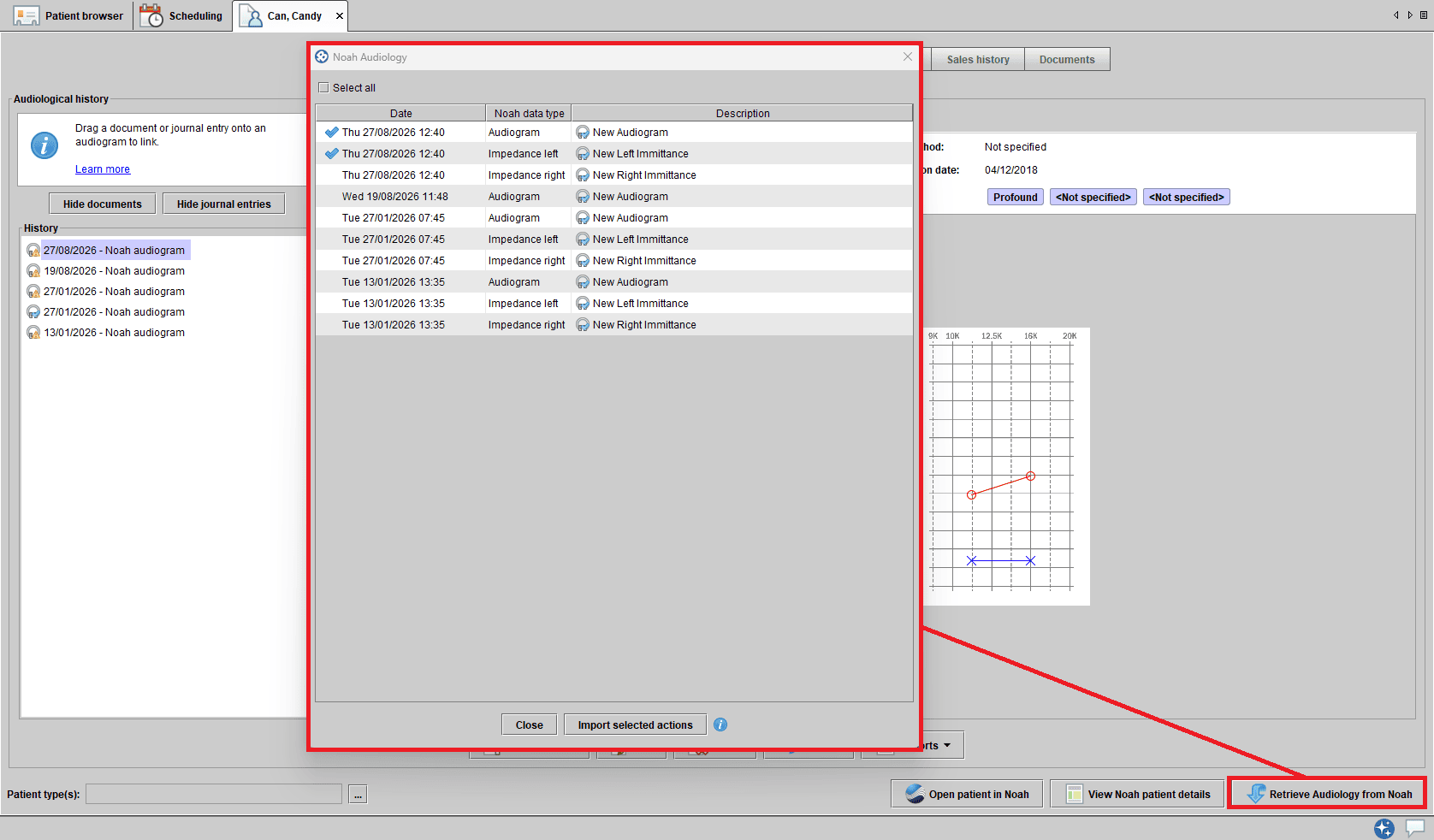
This update also gives users the ability to clear an existing Noah ES patient link. This is particularly helpful when a Noah ES patient has been accidentally linked to the wrong Blueprint OMS patient, allowing the incorrect connection to be removed.
These enhancements provide clinics with greater flexibility and control when managing the synchronization of patient data between Noah ES and Blueprint OMS and is especially helpful for mobile clinics without the internet connectivity, allowing for patient data synchronization between Noah ES and Blueprint OMS once the connection is restored.
2. New “current time” visualization on the scheduler
Blueprint OMS has adopted a new “current time” visualization on our Scheduler feature. Quickly see where you are in the day with a new current-time indicator in the scheduler. When viewing the full-day schedule for a single location on the current date, a visual marker shows the current time in relation to scheduled appointments.
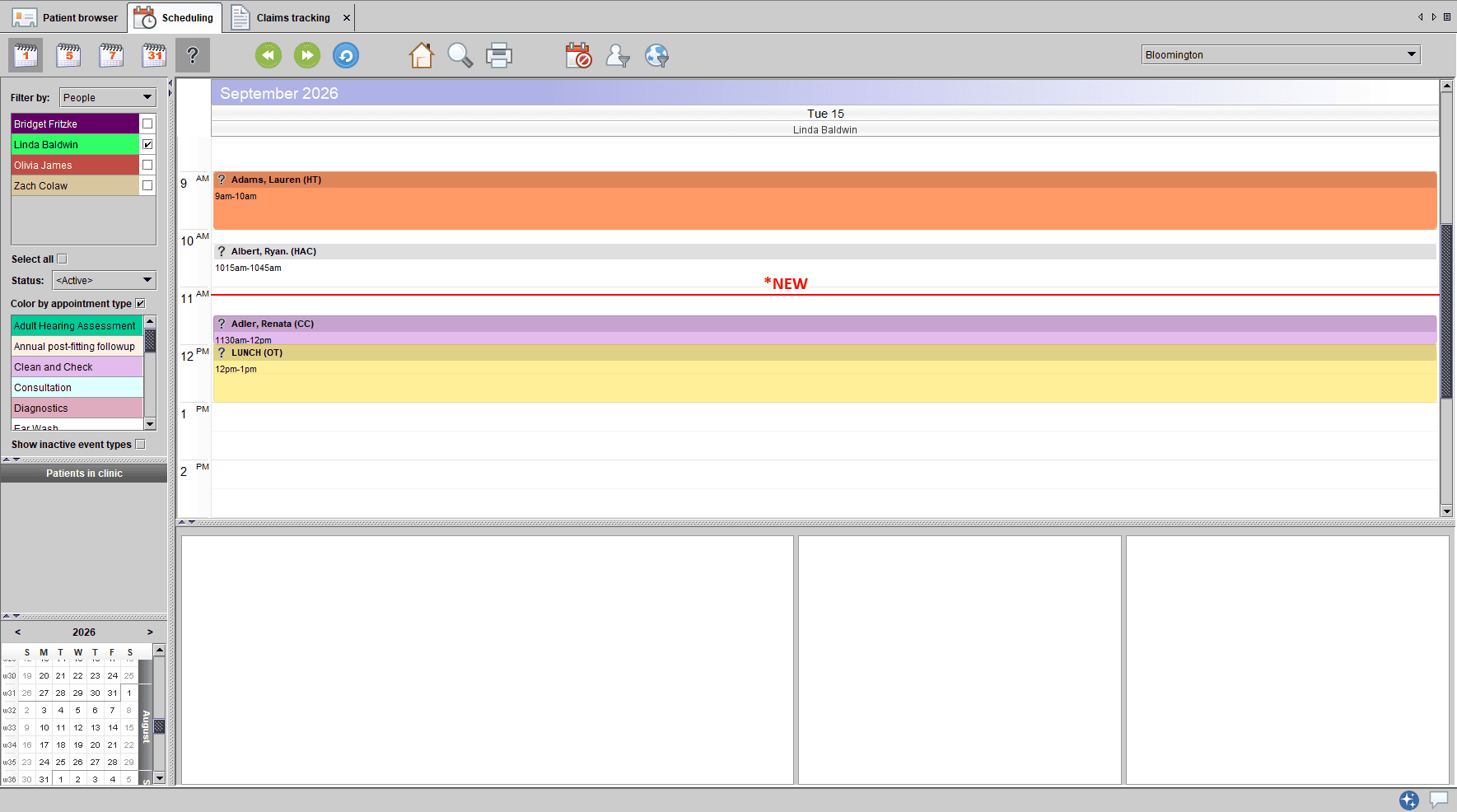
This at-a-glance reference helps clinic staff stay on schedule, anticipate upcoming appointments, and manage the day more efficiently.
3. Enhanced password requirements
Blueprint Solutions is strengthening the security of Blueprint OMS by now enforcing all password requirements when passwords are created or changed.
This enhancement helps protect clinic and patient information by ensuring that new passwords meet all established security requirements.
What’s changing?
- New users: When creating their Blueprint OMS account, new users must meet all password requirements before their password can be saved.
- Existing users: Existing users can continue to sign in with their current password. However, when an existing user changes their password, the new password must meet all password requirements.
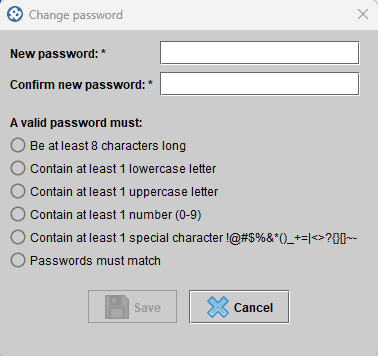
This change provides an additional layer of protection for your clinic while allowing a seamless transition for existing users to adopt a more secure password at a later date.
—

No comments